← All work

OkenHub.
One control plane for a portfolio of businesses.

Internal software that runs a portfolio of unrelated small businesses from one place: the projects, the people working on them, the hours those people bill, and what each venture costs to run.

Role
Sole engineer
Delivery
Production push to main deploys
Codebase
13,589 lines of Python · 38 models
Verification
55 automated smoke suites
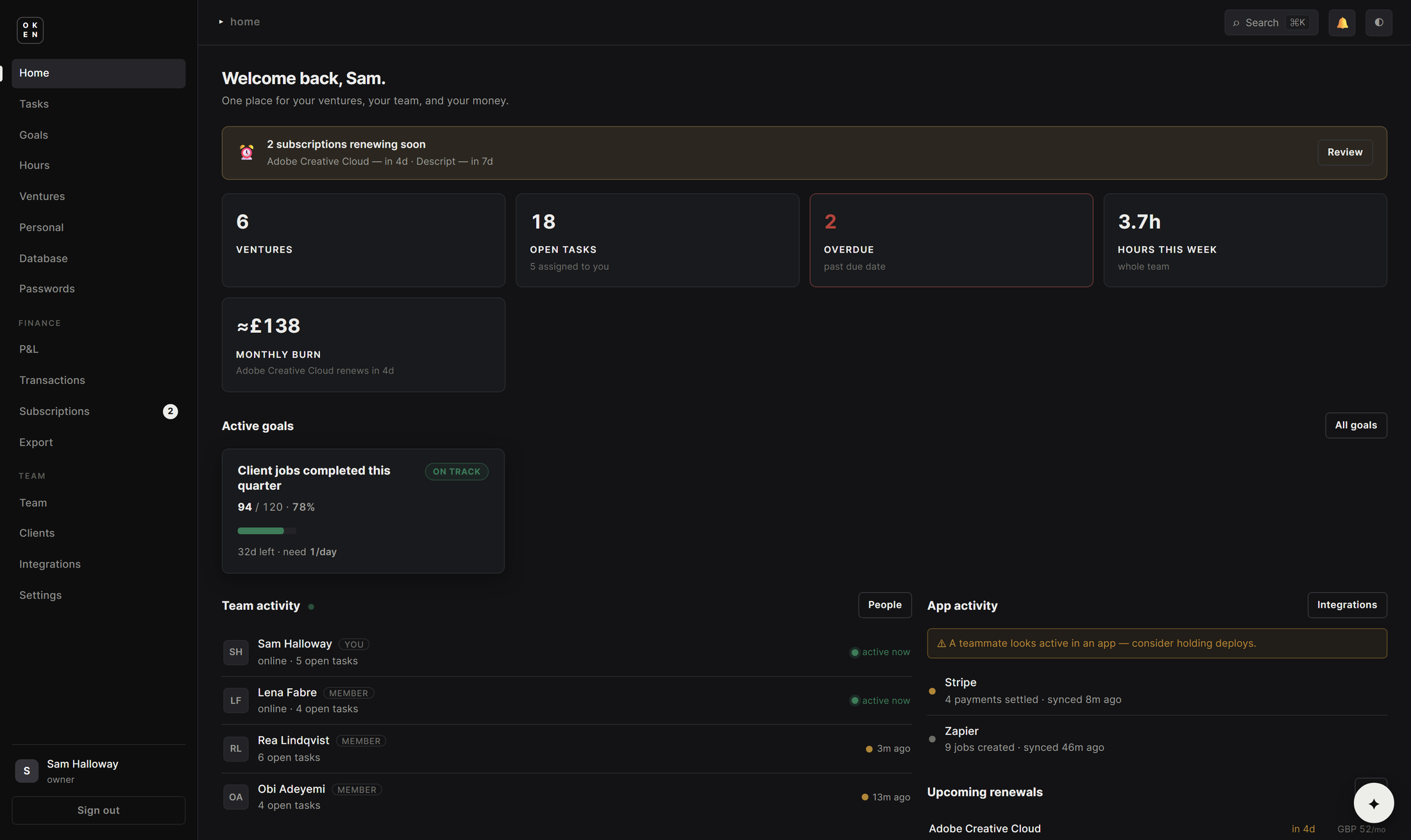
The OkenHub dashboard in the dark theme, showing venture and task counts, hours this week, monthly burn, an active goal, and live team activity

The dashboard · switch the theme and it swaps in placeFig. 01

The data in every screenshot here is a demonstration set. The company, the five ventures and the people working across them were invented for these captures, and none of them is a real client.

Overview01

OkenHub is the internal control plane for Oken Solutions: one web application that runs roughly a dozen unrelated ventures at once, from the tasks people are working on today to the hours they bill and what each venture costs to keep open.

Before it existed that meant ClickUp for project management, spreadsheets for hours and invoicing, and bank exports for finance. Nothing connected to anything else, so the number that actually mattered, cost per venture, had to be assembled by hand from four places every time anyone asked for it.

It replaces the slice of ClickUp that was genuinely in daily use, at a bill that had grown with every seat added, and the business owns the replacement outright. Everything in the app tags to a venture, so the rollup that used to be an afternoon of exports is now a query.
The calls I made02
01

Everything hangs off the venture

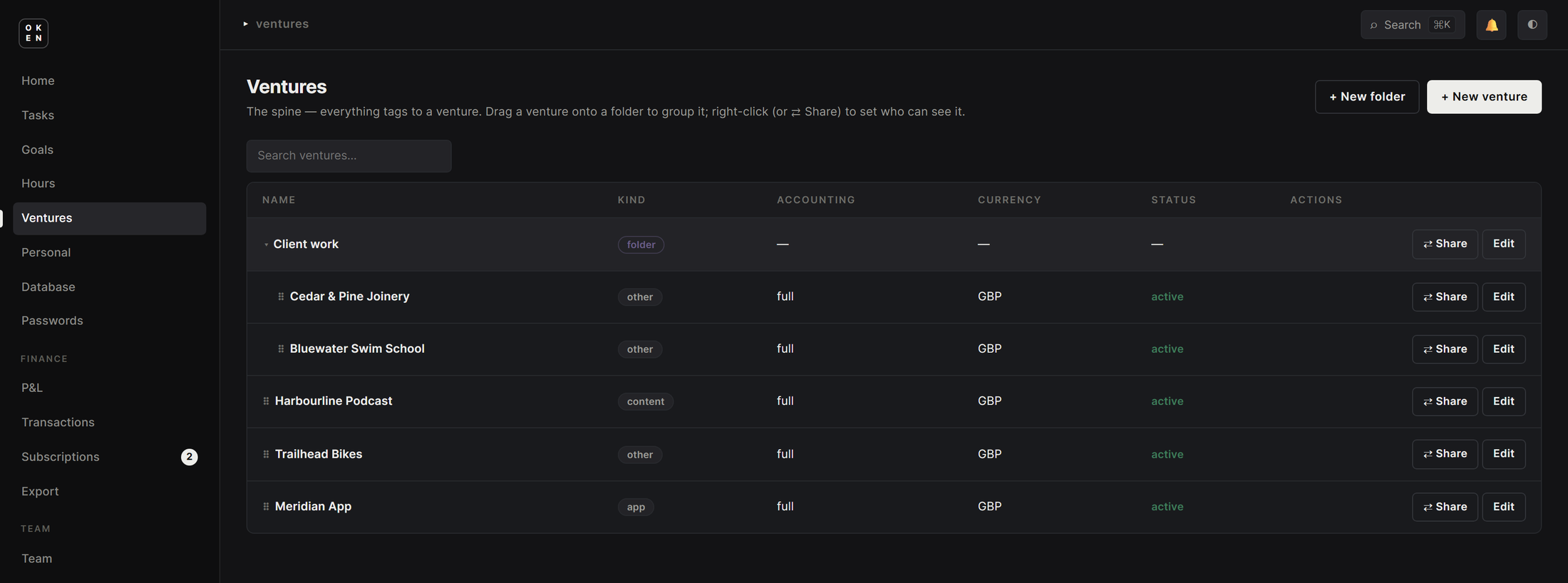
A venture is the spine of the schema. Every task, timer, transaction and subscription tags to one, and ventures group into folders that each carry their own colour, currency and accounting mode. That single constraint is what turns cost per venture from a manual exercise into a figure the database already knows.

02

Several timers at once, billed once

A person can run more than one timer, because a print batch runs unattended while they get on with something else. Billable hours are the wall-clock union of those intervals rather than their sum, so overlapping work is never charged twice. Rates are snapshotted at the moment time is logged, which keeps the cost of past work correct after a rate is renegotiated, and a timer left running when someone stops closes itself.

03

Matched the tool it replaced, not a reduced version of it

The parts of ClickUp in daily use were rebuilt rather than approximated: list, board and calendar views, user-definable statuses that double as Kanban columns, multiple assignees, subtasks, checklists, dependencies between tasks, custom fields with reusable templates, comments, recurring tasks, bulk edit, and saved views that follow a person to whatever device they open next. A partial imitation would have meant keeping the subscription anyway.

04

A smoke suite ships with every feature

Fifty-five automated smoke suites cover the app, one written with each feature as it went in. That is what makes a push to main deploy straight to production reasonable on a project this size, and fifty-six schema migrations have gone out the same way.

Tasks03

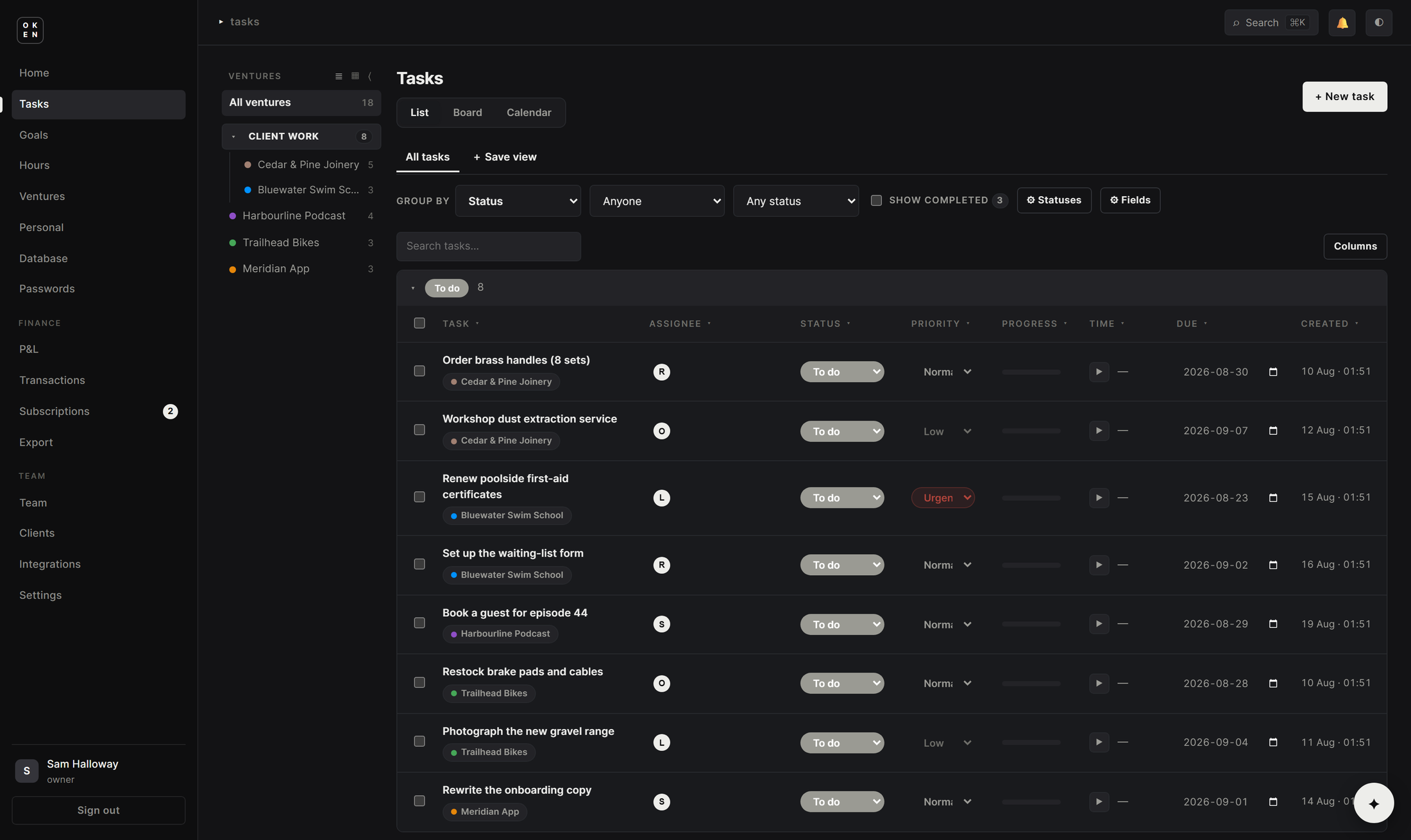
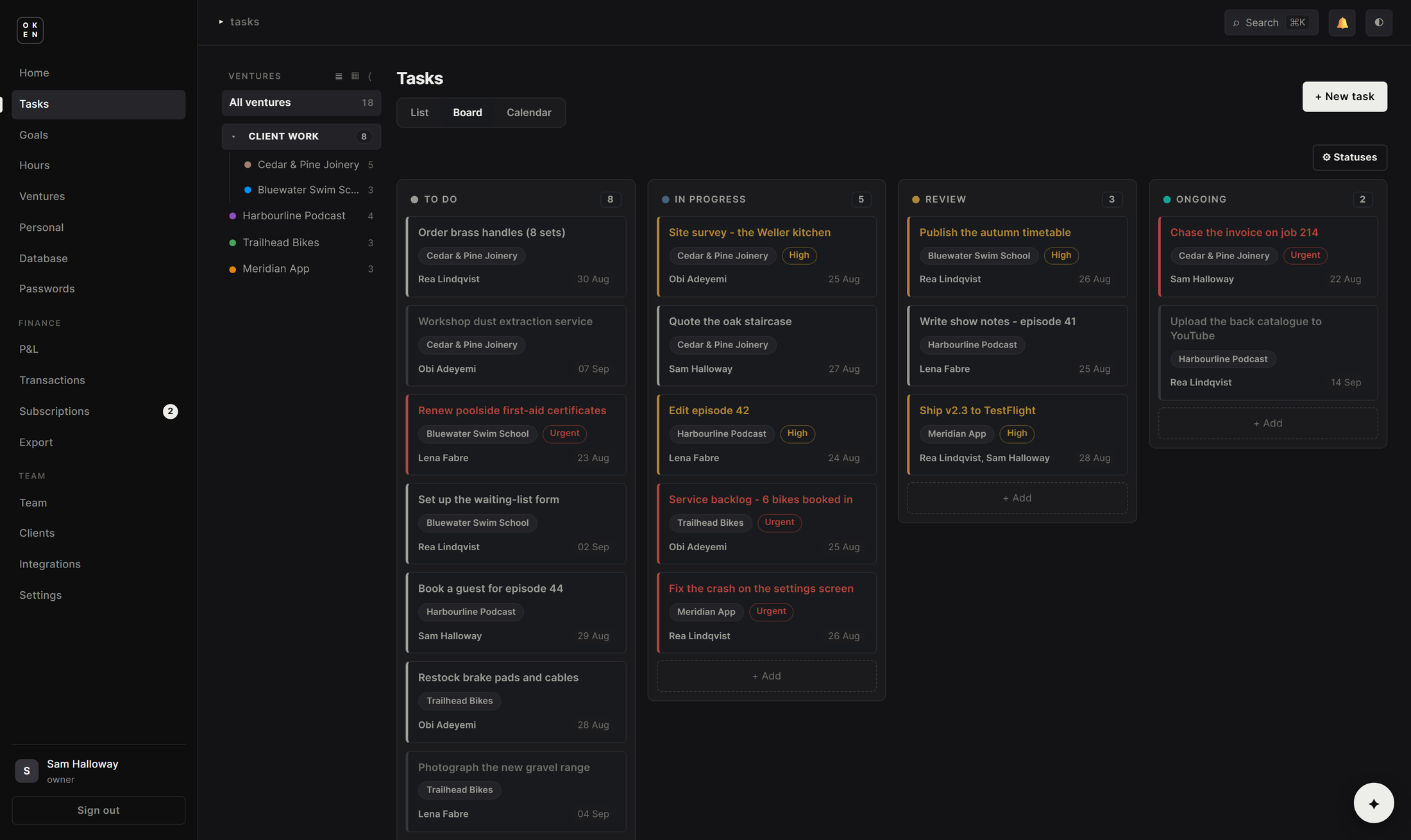
One set of tasks, three ways to look at it.

Statuses are defined by the user and double as the board's columns, so a venture that works in stages nothing else uses can have them without being moved to a separate tool. The same tasks appear as a list, a board or a calendar, filtered by venture from the tree on the left.

Grouping, filters and column choices save as named views that follow a person across devices. Status and priority are editable inline from the list, every row carries its own timer, and work can be selected in bulk or dragged into order.

The OkenHub Kanban board, with user-defined columns, venture tags, priority flags and multiple assignees

Board view · columns are the statuses the user definedFig. 02

The OkenHub task list, grouped by status, with saved views, inline editing and a timer on every row

List view · grouping, saved views and per-task timersFig. 03

Hours and cost04

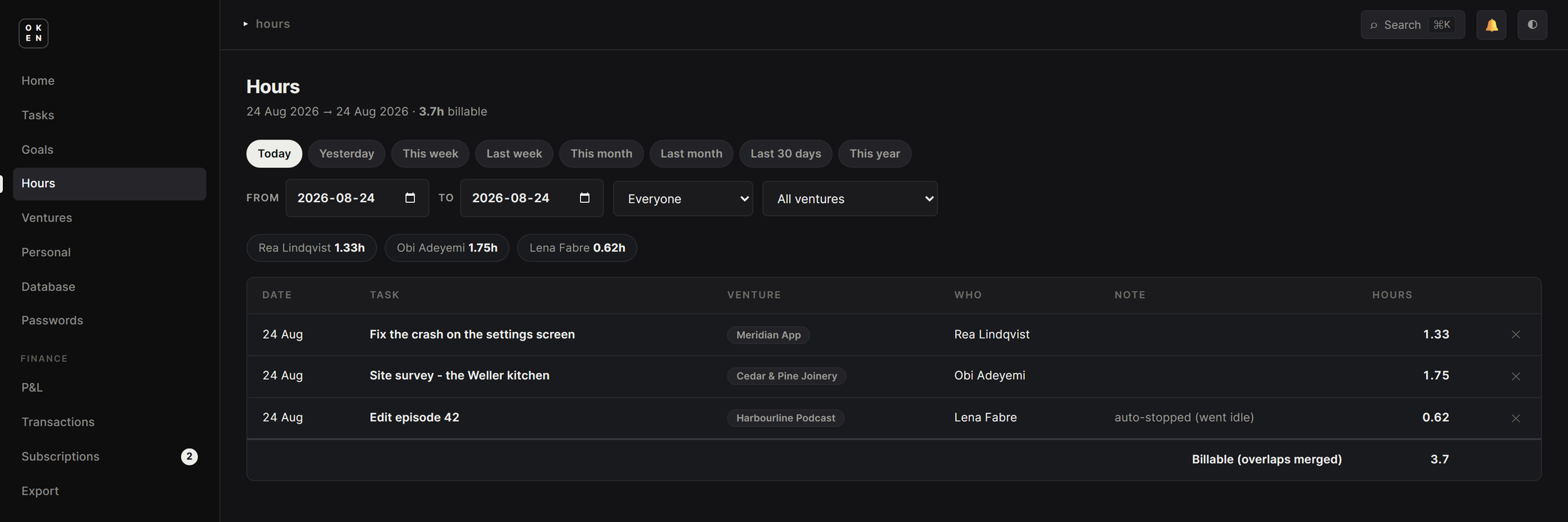
Overlapping time, counted once.

Hours filter by date range, person and venture, and total per person as well as for the team. The figure at the foot of the table is the merged one rather than the sum of the rows, which is the whole point of letting someone run two timers at the same time.

Rates belong to the person and are captured when the time is logged, so historical cost does not move when a rate changes. A timer that was forgotten closes itself and says so on the row it belongs to, instead of quietly billing a night's sleep.

The OkenHub hours table, with per-person totals, an auto-stopped timer note, and a billable total marked as having overlaps merged

Billable hours · the total at the foot has overlaps mergedFig. 04

The rest of the app05

Ventures

Registry with folders
Colour, currency and
accounting mode per venture
Visibility set per venture

Team

Live presence: who is online,
who is working, and on what
Roles and per-section access
Rates feed the cost rollup

Finance

P&L and transactions
Multi-currency subscriptions
Renewal alerts
Monthly burn on the dashboard

Goals

Targets with progress
Pace and an on-track flag
32d left, need 1/day

Personal

Day planner with drag-and-drop
time blocks
Reminders and personal goals
An accountability check-in

Assistant

Creates and updates tasks
Logs progress, sets reminders
By chat, by voice, or over
Telegram

Outside systems push work in through a key-scoped sync API. In production that is how The Forge, the operations software behind the print-on-demand business, hands batches of work to remote staff and starts and stops their timers, so the hours arrive here without anyone retyping them.

Calendar sync runs the other way and stays one-way on purpose. It carries no financial fields at all, so an outside agent can read the week without being given an account in the Hub.

Read about The Forge ↗
The OkenHub venture registry, listing each venture with its folder, kind, accounting mode, currency and status

The venture registry · the spine everything else tags toFig. 05

The interface06

No framework, and nothing to build.

The entire interface is server-rendered templates and hand-written JavaScript, including the parts that usually justify reaching for a framework: the Kanban drag-and-drop, the activity feed that updates as people work, the rich-text editor and the day planner. There is no dependency tree to keep current and no build step standing between a change and production.

The stylesheet is 1,861 lines, written by hand, and carries both themes across all fifty-eight templates, which is what the switch under the first screenshot on this page is moving between. The same markup is responsive down to a phone and installs as a progressive web app, with a cached shell offline and push notifications.

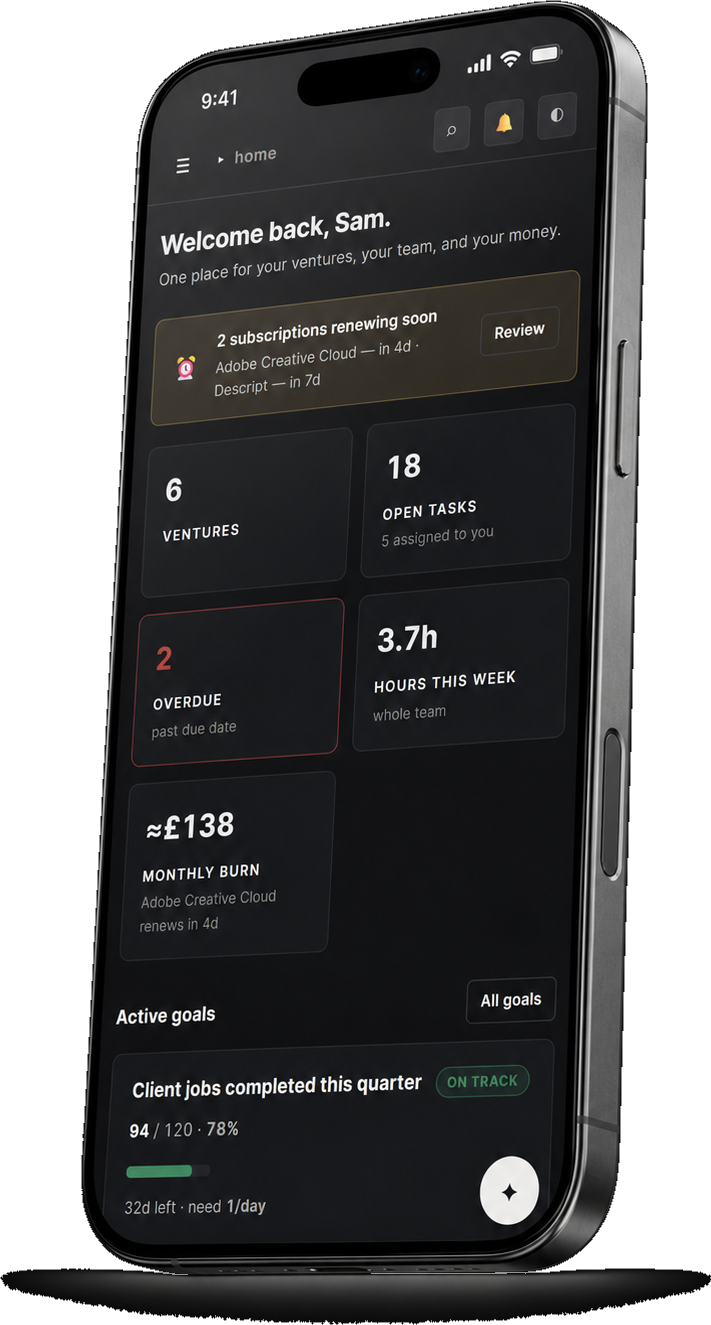
On a phone07

The same app, installed to the home screen.

Freelancers work from wherever they are, so the board, the timers and the day planner had to be usable on a phone rather than merely visible on one. It is the same markup and the same server, laid out for the viewport it lands on.

The OkenHub dashboard on a phone

The dashboard on a phoneFig. 06

Built with08

Framework

Flask
SQLAlchemy · Alembic
Jinja templates

Data

PostgreSQL in production
SQLite in development
38 models · 56 migrations

Front end

Server-rendered HTML
Vanilla JavaScript
1,861 lines of hand-written CSS

Deployment

Docker on Railway
Push to main deploys
55 smoke suites

Reach

Installable PWA
Push notifications
Telegram assistant

Built solo from July 2026: 152 commits, 13,589 lines of Python across 41 modules, and 58 templates. In daily production use inside the business, and deliberately kept free of entanglement with the other apps so that it could be extracted later.